have access on a local computer to the two datasets we’ll use in future tutorials
15.2 Introduction
The next part of the module is intended to give you, as a data analyst, a process work through that can be applied to any dataset you wish to work with. It is important to note that many datasets, especially those in sport, are often quite ‘messy’ and present several issues we need to address before we can proceed to analyse that data with any confidence.
By working through each of these stages, you will have confidence in the integrity of your data, a solid understanding of its structure and content, and a secure foundation for the analysis and reporting of that data.
We will expect you to discuss each of these stages as part of any analysis you present during your time on the MSc SDA.
Caution
The tutorials that follow assume you have already completed the tutorials 1.0-3.1, and that you have access to R and RStudio.
15.3 Working Datasets
In the practical examples for the following tutorials, I have used two datasets (t10_data_b1700_01, t10_data_b1700_02) that you should download (EPL Table as of 14th April 2023):
# import the first dataseturl <-"https://www.dropbox.com/scl/fi/n9l6lfr0q2o69mphkov4m/t10_data_b1700_01.csv?rlkey=9bdr3wmm344316wte04b897hl&dl=1"df1 <-read.csv(url)head(df1)
  X Pos              Team Pl  W  D  L  F  A GD Pts
1 1   1           Arsenal 30 23  4  3 72 29 43  73
2 2   2   Manchester City 29 21  4  4 75 27 48  67
3 3   3  Newcastle United 29 15 11  3 48 21 27  56
4 4   4 Manchester United 29 17  5  7 44 37  7  56
5 5   5 Tottenham Hotspur 30 16  5  9 55 42 13  53
6 6   6       Aston Villa 30 14  5 11 41 40  1  47
rm(url)# import the second dataseturl <-"https://www.dropbox.com/scl/fi/jb9b9uhx728e4h6g46r1n/t10_data_b1700_02.csv?rlkey=3sjwjwd6y59uj5lq588eufvpm&dl=1"df2 <-read.csv(url)head(df2)
  Pos              Team Pl  W  D  L  F  A GD Pts
1   1           Arsenal 30 23  4  3 72 29 43  73
2   2   Manchester City 29 21  4  4 75 27 48  67
3   3  Newcastle United 29 15 11  3 48 21 27  56
4   4 Manchester United 29 17  5 42 44 37  7  56
5   5 Tottenham Hotspur 30 16  5  9 55 42 13  53
6   6       Aston Villa 60 14  5 11 41 40  1  47
rm(url)
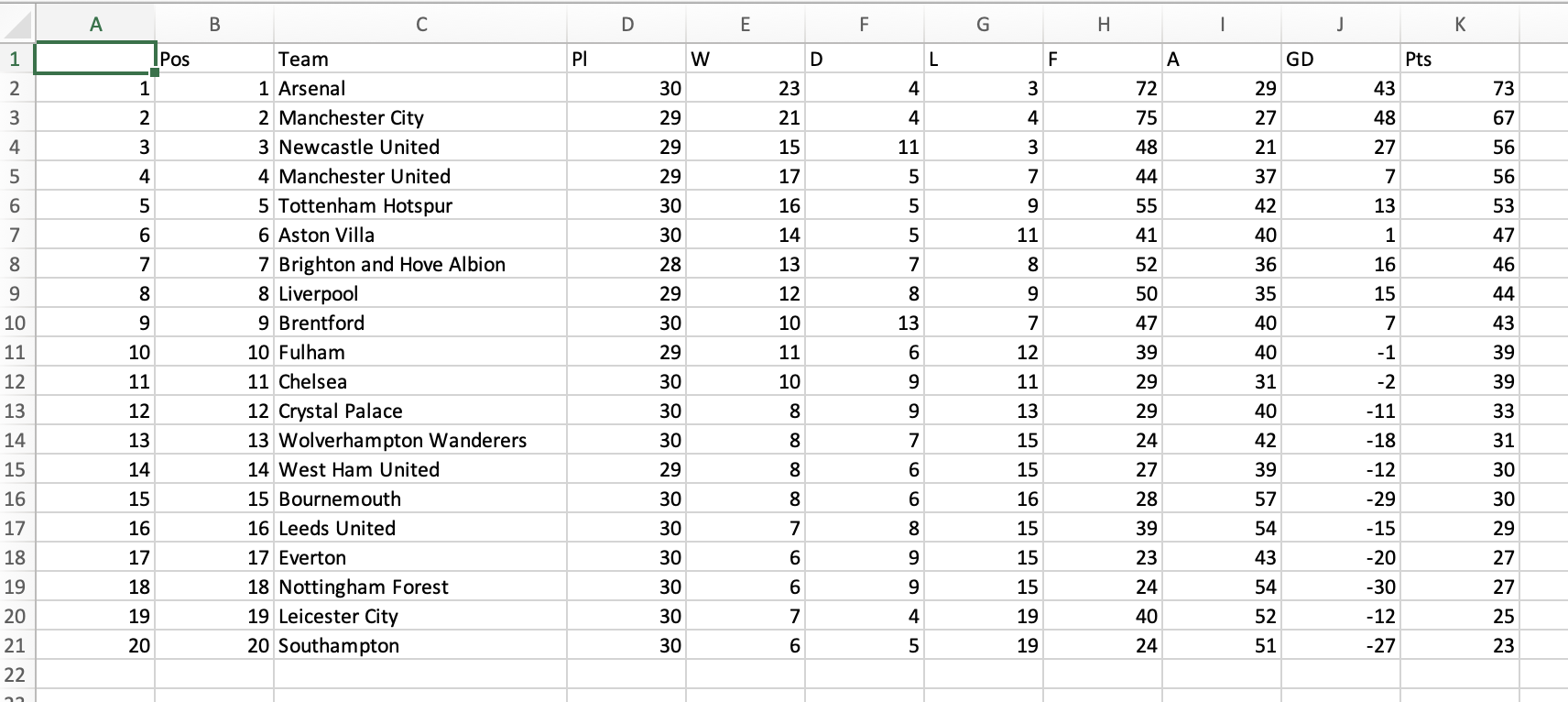
The datasets are in .csv format. For reference, here is what the dataset t10_data_b1700_01 looks like in Excel:
15.4 Activity: Download the Datasets
You should now save the two datasets to a suitable location for further work.